
Editing variations one
by one is soul-crushing.
WooCommerce’s variation screen crawls past 50 rows. Edit price, stock and SKUs for every variation in one fast spreadsheet grid, then save once.
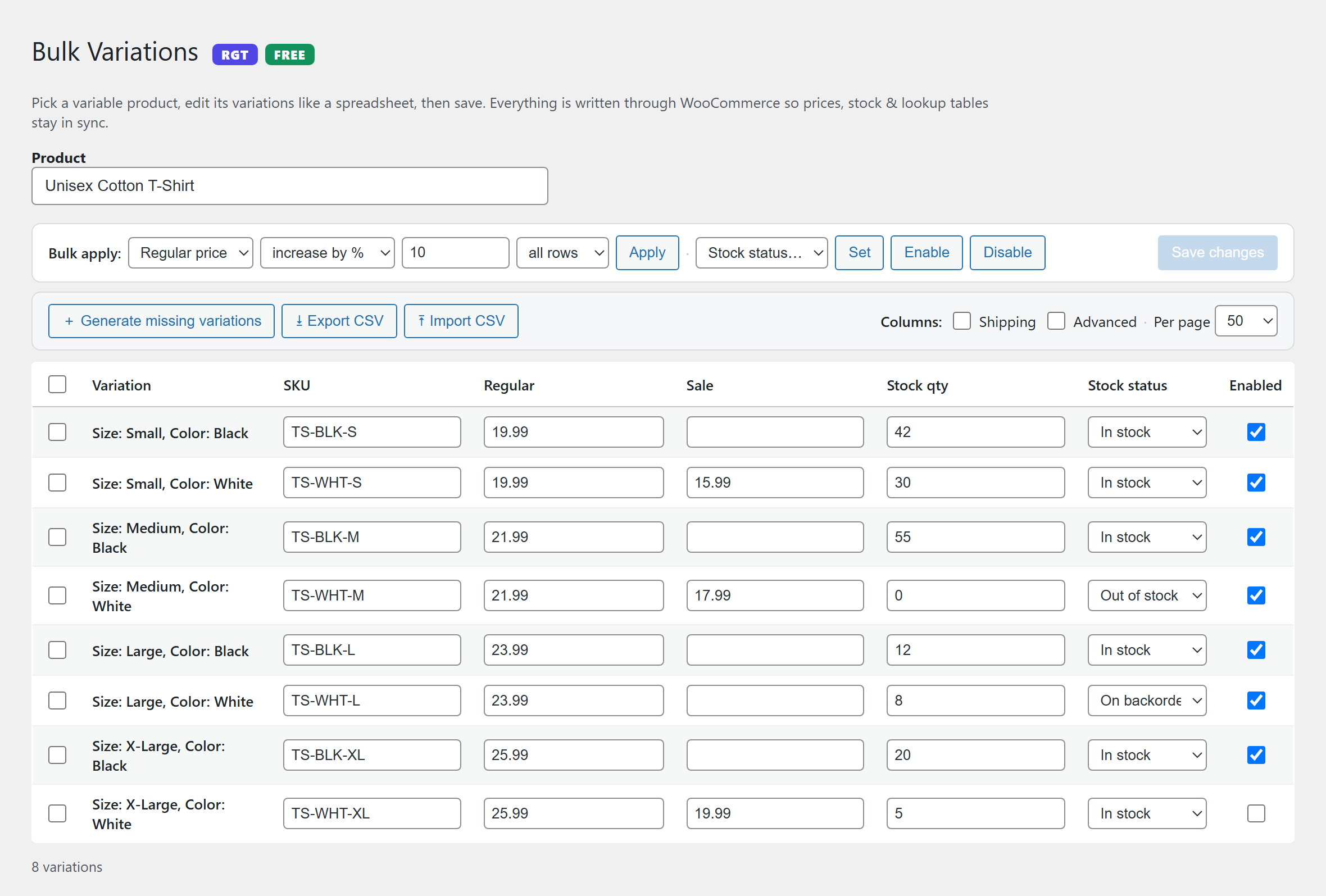
Products with dozens of variations turn a simple price change into an afternoon. A spreadsheet view turns it into a coffee break.
See the difference
From one-by-one to all-at-once
Same 50-variation product. One way tests your patience. The other respects your time.
Before
Click a row, wait for it to expand, edit one field, collapse, scroll, repeat.
After, ReadyGo
Grid viewPaste columnsA clean grid of every variation. Edit like a spreadsheet, paste from Excel, bulk-fill a column, save the lot in one click.
Why shop managers love it
Variations without the misery
Fast, familiar and entirely on your own server.
Spreadsheet grid
Every variation in one editable grid. Tab, type, paste, done.
Bulk price and stock
Set price, sale price and stock across all variations at once.
Nothing gets missed
See the whole matrix at a glance instead of scrolling forever.
Fast on big products
Handles hundreds of variations without the admin screen choking.
No external services
Runs on your store. No fees per edit, no data sent anywhere.
Save once
One save writes every change. No row-by-row guessing.
How it compares
Built for real catalogues
| Stock WooCommerce | ReadyGo | |
|---|---|---|
| Edit all variations at once | One at a time | Spreadsheet grid |
| Bulk price / stock | Manual per row | One action |
| Paste from Excel | No | Yes |
| Per-edit fees | n/a | Never |
Dead simple
From install to saved in 3 steps
Install and activate
Free from WordPress.org.
Open a product
Its variations load into the grid instantly.
Edit and save
Change everything, save once, move on.
Reclaim your afternoon
Bulk-edit every variation in a fast grid. Free, on your own server, no external services.
Get it freeWho Uses Spreadsheet Editing for Variations
Shop managers handling clothing lines, art prints, or modular products know the pain of the default variations screen. Every color, size, or material combination becomes its own row to click, wait for, edit, and save. For a shirt with 8 colors and 5 sizes, that is 40 separate clicks just to change price. For large catalogs or frequent updates, the default WooCommerce flow wastes hours every month.
This plugin is built for anyone managing products with genuine variation depth: e-commerce managers running apparel stores, furniture shops configuring multiple dimensions, or print-on-demand businesses juggling hundreds of SKU combinations. If you edit variations more than once a week, a grid makes your workflow instantly faster.
What You Can Edit in the Grid
- Regular price and sale price across all variations at once
- Stock quantity for inventory management
- SKU codes for tracking and integration
- Weight and dimensions for shipping calculations
- Enable or disable individual variations
- Copy values down a column or across rows
- Paste data directly from Excel or Sheets
- See all changes before saving a single time
Common Questions About the Variation Grid
How many variations can it handle? The grid loads as many as your product has. Shop managers report editing 100-plus-variation products without lag.
Can I edit attributes or create new variations? No. The grid works with existing variations only. You still create new variation combinations in the standard WooCommerce interface, then bulk-edit their prices and stock in the spreadsheet view.
What if I make a mistake in the grid? You see all edits before you save. Click away or refresh the page without saving to discard changes.
Does it work with variable subscription products? Yes. It edits any product with variations, including subscriptions.
Can I export the variations data? The grid is for editing on your site. To extract variation data for external tools, use the standard WooCommerce export.
Plugins That Work Well Together
If you are optimizing your store for speed and clarity, explore the full ReadyGo plugin collection. The ReadyGo Toolkit adds essential admin utilities, while ReadyGo Reading Time helps shoppers gauge content length on product and blog pages. Browse all available tools to see which other plugins fit your store workflow.
Secure payment by Stripe. Your card details never touch our servers.