
One sale, or three?
Add the “Frequently bought together” box to your product pages. Shoppers add the whole set in one click, and your average order value climbs.
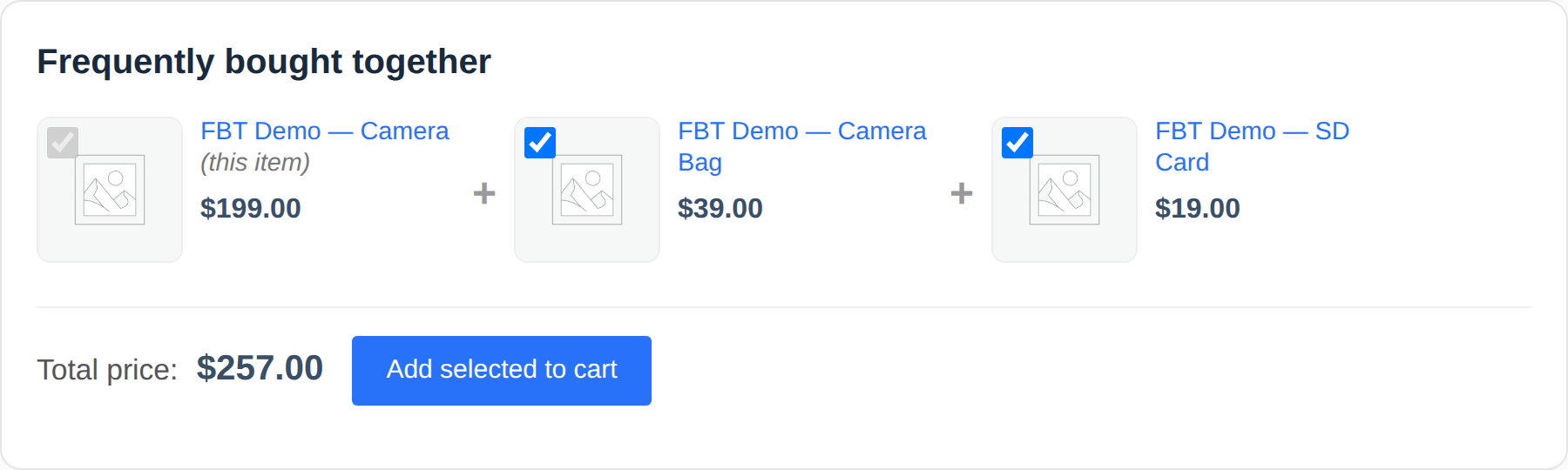
Shoppers who just decided to buy are the easiest to sell one more thing to. Put the matching items right there and let them add all of it in one click.
See the difference
From single item to full basket
Same product. One version sells it alone. The other sells the set.
Before
A lone Add to Cart button. Whatever else they needed, they will forget.
After, ReadyGo
Bought togetherAdd all 3The camera, the case and the memory card, bundled with a total and an Add all 3 button. Bigger order, same visit.
Why it lifts revenue
More in every cart, automatically
The upsell box big stores rely on, free and fully in your control.
One-click bundle
Shoppers add the whole set to the cart in a single click.
Higher order value
Sell accessories alongside the main product, right where they decide.
You pick pairings
Choose exactly which products show together. No guessing.
Works out of the box
Drop it in and the bundle box appears on your product pages.
Live total
The running total updates as items are added or removed.
Lightweight
Loads only where needed. No external services, no bloat.
How it compares
The upsell box, without the price tag
| Paid bundle plugins | ReadyGo | |
|---|---|---|
| Frequently bought together | $39+ | Free |
| Manual pairings | Pro only | Included |
| One-click add all | Pro only | Included |
| External services | Often | None |
Dead simple
Selling more in 3 steps
Install and activate
Free from WordPress.org.
Pick the pairings
Choose the products that belong together.
Watch AOV rise
Shoppers add the set in one click.
Turn one sale into three
Add the frequently-bought-together box and grow every order. Free, you control the pairings.
Get it freeHow the Frequently Bought Together Plugin Works
The plugin displays a “frequently bought together” box on your product pages that shows complementary items customers might want alongside their main purchase. After a shopper adds the primary product to their cart, the bundle suggestion appears with a single “Add all” button. When they click it, the entire bundle enters their cart at once, with a running total that updates in real time. There are no forced purchases, no upsells that feel pushy. Shoppers see the set, see the price, and decide. If they want all of it, one click. If not, they continue with just the main item.
Behind the scenes, you manage all the pairings in the WordPress admin. Select a product, choose which items pair well with it, save, and the box appears on your site. The plugin handles the rest. There is no AI trying to guess which products go together, no external service watching your sales, no complex configuration. You know your inventory. You decide the bundles. The plugin displays them.
Why Bundling Lifts Order Value
- Shoppers are in a purchase mindset when they see the bundle, making add-ons feel like a natural next step
- A pre-selected set of items reduces decision fatigue, so fewer people abandon mid-browse
- The one-click “Add all” button removes friction that kills impulse add-on purchases
- Showing the bundle price upfront builds trust and eliminates surprise costs at checkout
- You control every pairing, so recommendations stay relevant to your product mix
- Mobile shoppers get the same lean, fast experience as desktop users
- No external dependencies mean faster load times and no tracking overhead
Frequently Asked Questions
How do I set up bundles for my products?
In the WordPress admin, go to each product and use the Frequently Bought Together metabox to select which products should appear as companions. You can add multiple items to a bundle. Save and the box appears on your product page immediately. No coding, no waiting for indexing. Changes are live right away.
Can I use this with variable products like shirts in different sizes?
Yes. The bundle box works on variable products. Shoppers select their size or color variation and then see the bundle suggestion. The linked products are added with their standard options, so a shirt bundle stays as clean as a simple product bundle.
What if I have hundreds of products? Do I need to bundle everything?
No. Focus on products that have clear companions. A camera with a case and tripod. A monitor with a cable. Tools with accessories. Even five or six strategic bundles across your best sellers will move more volume than trying to pair every single item. Quality over coverage.
Does the bundle box slow down my site?
No. The plugin loads only on product pages and adds minimal HTML and CSS. There are no external API calls, no tracking pixels, no third-party services. The bundle box loads as fast as a native WooCommerce product page.
What happens if a bundle item is out of stock?
The bundle will still display if the main product is in stock, but the out-of-stock items will be marked unavailable or removed from the set by the plugin to keep the bundle valid. You can configure this behavior, or manually unlink products when they are discontinued.
Grow Your Store with ReadyGo Plugins
Frequently Bought Together works best alongside other revenue-boosting plugins. Pair it with the Buy Now button to capture impulse buyers who want to skip the cart, or add the Gift Wrap plugin for post-purchase upsells. Check out the full collection at readygotools.com/plugins/ for more free WooCommerce tools built to increase conversions without monthly fees or external dependencies.
Secure payment by Stripe. Your card details never touch our servers.